5 Contractor Software Tools to Save Time and Boost Profits
By Editorial Team
Updated on March 19, 2026

Whether you’re gearing up for a busy summer in downtown Vancouver or preparing crews for rural builds in Alberta, technology has become essential to staying organized and competitive during peak season. As demand ramps up, successful contractors rely on more than their tools and crew—they depend on software to streamline operations, respond quickly to incoming leads, keep clients informed, and maintain steady cash flow.
Join Our Network and Receive Real Leads!
Do you want to start getting some real leads with serious customers?
With summer workloads intensifying, juggling quoting, scheduling, invoicing, accounting, and client communication leaves little room for inefficiencies. A well-structured digital toolkit doesn’t just reduce daily chaos—it enables faster client follow-up, clearer team coordination, and stronger operational readiness. The result is a smoother workflow, higher conversion rates, and more consistent profitability throughout the busiest time of the year.
Why Digital Tools Matter for Contractors

Source: RenoQuotes
Running a contracting business means managing moving parts that don’t always fit neatly together. Without a unified system, it’s easy to waste time on repetitive data entry, lose track of costs, or miss out on new opportunities.
When your digital tools work together, you can:
Generate accurate quotes faster and win more jobs
Stay organized on multiple active sites
Track labour and materials in real time
Send invoices automatically and get paid sooner
Keep your crew and clients updated instantly
Modern contractor software isn’t just about managing numbers or schedules—it’s also about keeping everyone connected. Many platforms offer real-time notifications, shared calendars, and secure document sharing, making it easy for teams, clients, and stakeholders to stay updated and collaborate from anywhere. With instant communication tools built in, you can quickly coordinate changes, share progress updates, and ensure everyone is working from the latest information, reducing delays and costly misunderstandings.
Whether you’re an independent remodeler or a small construction company operating in multiple provinces, a solid tech stack helps you scale without losing control. Here are five that are sure to meet your needs:
1. Estimating and Quoting Software: Clear Estimates
Accurate estimates, compelling bids, and prompt invoicing are essential for winning jobs and maintaining healthy cash flow. Clear Estimates is designed to streamline these financial tasks, helping contractors reduce admin time and boost professionalism.
Clear Estimates features a robust cost database with over 10,000 line items, customizable for Canadian pricing and local market conditions. Contractors can build detailed estimates quickly, using templates for kitchens, bathrooms, decks, and more. Once an estimate is ready, it can be instantly turned into a polished proposal or formal bid—complete with branding, line-item details, and optional add-ons for upselling.
The platform’s workflow doesn’t stop at winning the job. Approved estimates can be converted into invoices with a single click, ensuring every billable item is captured and reducing manual entry errors. Integration with QuickBooks and other accounting software means that project financials—from initial quote to final payment—stay in sync and easily trackable.
Key selling points:
10,000+ editable line items for precise, fast estimating
Templates for common project types and custom jobs
Seamless conversion from estimate to proposal, bid, and invoice
Branded, professional documents to impress clients and speed approvals
Integration with QuickBooks for unified financial management
Customizable tax fields for GST/HST compliance in Canada
Digital delivery and e-signature options for faster turnaround
By automating estimating, bidding, and invoicing, Clear Estimates helps contractors win more work, get paid faster, and minimize costly mistakes.
2. Project Management Software: Jobber
After winning a project, the next challenge is keeping it on schedule and on budget. Jobber, based in Edmonton, Alberta, has become one of the top choices for Canadian contractors seeking a simple, field-ready project management solution.
Jobber is designed for home service and contracting businesses. It centralizes job scheduling, client communication, crew assignments, and billing—all in one mobile-friendly platform.
Key selling points:
Intuitive scheduling and dispatch tools
In-app quotes, invoices, and payment processing
Client portal for approvals and updates
Integration with QuickBooks Online for accounting
Jobber’s biggest strength lies in its accessibility. Whether you’re managing a roofing crew in Calgary or landscaping projects across Ontario, Jobber keeps every part of your business organized and connected.
3. Accounting and Bookkeeping Software: QuickBooks Online
Financial clarity is essential to sustainable growth. QuickBooks Online (Canadian edition) remains the leading accounting platform for small and medium-sized contracting businesses nationwide.
This cloud-based system tracks income, expenses, payroll, and taxes while syncing automatically with your bank accounts and other software. The Canadian version supports GST/HST calculations and integrates seamlessly with both Jobber and Clear Estimates.
Key selling points:
Cloud access for contractors and accountants anywhere in Canada
Automatic bank feeds and expense categorization
Online invoicing and payment acceptance in CAD
GST/HST tracking and CRA-compatible reporting
When properly integrated, QuickBooks Online eliminates redundant data entry between estimating, job management, and accounting—giving contractors a real-time view of profitability across every project.
4. Customer Relationship Management (CRM) Software: HubSpot CRM
Winning new clients and maintaining existing ones takes more than skill on the job site—it requires organized, consistent communication. HubSpot CRM offers an excellent free-to-start option that’s well-suited for contractors who want to manage leads, track follow-ups, and automate reminders.
Unlike some built-in CRMs that come with estimating or project management tools, HubSpot provides a more robust standalone system that integrates easily with QuickBooks, Jobber, and Gmail.
Key selling points:
Free entry-level plan with essential contact management features
Visual pipeline tracking for leads and jobs
Email automation and client follow-up reminders
Integrations with major contractor tools and email platforms
For contractors ready to move beyond paper lists and missed callbacks, HubSpot CRM helps ensure that no lead slips through the cracks—turning inquiries into paying clients.
5. Integration and Automation Platform: Zapier
Even the best tools can become frustrating if they don’t communicate. Zapier bridges that gap, connecting hundreds of popular apps—like QuickBooks Online, Jobber, HubSpot, and Clear Estimates—without the need for coding or complex setup.
With Zapier, contractors can automate workflows that normally take hours of manual effort. For instance, when a new lead is added to HubSpot, Zapier can automatically create a new job in Jobber, generate a draft quote in Clear Estimates, and record the contact in QuickBooks.
Key selling points:
Connects over 6,000 apps used in business operations
Simple “if this, then that” automations (called Zaps)
Reduces data duplication between systems
Offers free and affordable paid tiers for small businesses
By linking your tech stack together, Zapier turns your individual tools into a seamless ecosystem—allowing your team to focus on work that drives revenue, not data entry.
Bonus: Prequalification and Compliance Management
In Canada’s highly regulated construction industry, ensuring that every contractor and subcontractor meets strict standards isn’t just best practice—it’s a legal and financial necessity. Prequalification and compliance management are critical steps in mitigating risks, demonstrating due diligence, and maintaining a safe, reputable operation. Modern contractor software plays a pivotal role in streamlining these processes, helping businesses efficiently vet, monitor, and manage their workforce.
Prequalification involves evaluating contractors before they ever set foot on a job site. This process typically assesses credentials, safety records, insurance coverage, financial stability, and alignment with industry standards such as the Certificate of Recognition (COR). Manual vetting can be time-consuming and inconsistent, leading to gaps that may expose your business to liability or project delays.
Key selling points:
Customizable questionnaires and digital forms to collect certifications, insurance, and safety program details
Automatic credential validation against OHS standards and COR compliance
Centralized, cloud-based document storage with expiry tracking
Real-time reporting on contractor status, risk profiles, and compliance gaps
Beyond initial vetting, ongoing compliance management ensures that contractors continue to meet legal and safety requirements throughout the project lifecycle. Modern software platforms offer certificate monitoring, expiry alerts, and performance analytics, allowing businesses to proactively address issues before they escalate.
By leveraging these digital tools, Canadian contractors can:
Reduce administrative overhead and minimize manual errors
Demonstrate due diligence in line with evolving legal expectations
Confidently select and manage a network of qualified, compliant contractors—protecting both their business and their reputation
Building a Smart, Canadian-Friendly Tech Stack
Source: Soluo
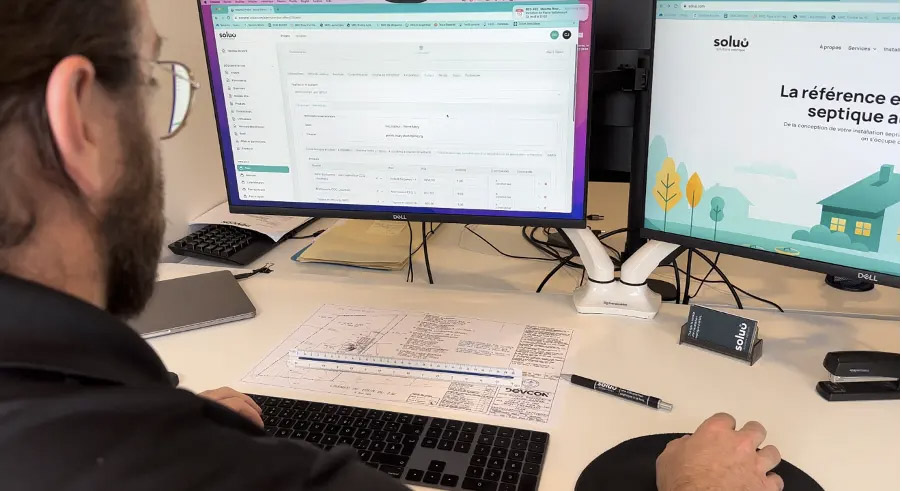
No two contracting businesses are alike, but every successful one relies on organization and consistency. When evaluating your own tools, start with the area that causes you the most friction—whether that’s estimating, job tracking, or client management—and build outward from there.
As you adopt new software, verify that each tool:
Supports Canadian currency and tax settings (GST/HST)
Integrates with your other apps
Offers reliable cloud and mobile access for field teams
Provides responsive Canadian or North American support
Rolling out one platform at a time and training your team thoroughly will make adoption smoother and prevent data chaos.
Final Thoughts
From Halifax to Kelowna, contractors across Canada preparing for the summer rush are discovering how digital tools can transform their operations and support higher demand. When timelines tighten and lead volume increases, having the right systems in place becomes critical: Clear Estimates speeds up quoting so you can respond to prospects quickly, Jobber keeps projects and crews organized, QuickBooks Online ensures your finances stay on track, HubSpot CRM structures timely client follow-ups, and Zapier connects everything to eliminate manual tasks.
The result? Less time on paperwork, fewer costly mistakes, faster payments, and—most importantly during peak season—more opportunities captured through quick, consistent client communication.
Your next competitive advantage this summer might not be a new piece of equipment—it might be a smarter, more connected tech stack that keeps your team ready, responsive, and built for growth.
FAQ
What is contractor software, and how can it help my business?
Contractor software refers to digital tools designed to streamline key aspects of running a contracting business, such as estimating, project management, accounting, client communication, and workflow automation. By centralizing information and automating repetitive tasks, contractor software helps you save time, reduce errors, and improve both client satisfaction and profitability.
How do I choose the right contractor software for my business?
Start by identifying your biggest pain points—do you struggle most with estimating, scheduling, invoicing, or keeping track of client communications? Look for solutions that directly address those challenges. Prioritize software that:
Supports Canadian tax and currency settings (GST/HST)
Integrates with your existing tools
Offers cloud and mobile access for field and office use
Provides reliable customer support in Canada or North America
It’s also wise to test software with free trials or demos before making a commitment.
Can contractor software integrate with my existing accounting or CRM systems?
Yes, many leading contractor tools are designed to integrate seamlessly with popular accounting platforms (like QuickBooks Online) and CRMs (such as HubSpot). Integration platforms like Zapier can further connect your software ecosystem, automating data transfer and reducing manual entry.
Is contractor software suitable for small businesses or independent contractors?
Absolutely. Most modern contractor software offers flexible plans that scale to fit businesses of all sizes—from solo tradespeople to growing construction firms. Look for solutions with user-friendly interfaces and affordable pricing tiers tailored to small business needs.
What are the benefits of using cloud-based contractor software?
Cloud-based solutions allow you and your team to access project information, client details, and financial data from anywhere—whether you’re in the office, on a job site, or working remotely. Cloud software also ensures your data is securely stored, automatically backed up, and kept up-to-date with regular updates.
How secure is my data with contractor software platforms?
Reputable contractor software providers use industry-standard security measures, including encryption, secure cloud storage, and regular system updates. When evaluating options, check for details about data protection, compliance with Canadian privacy laws, and the availability of local support.
Are there free options for contractor software?
Some platforms offer free entry-level plans or extended trial periods, especially for CRM and workflow automation tools. These can be a great way to test features and see what works best for your business before investing in paid subscriptions.
Where can I find additional guidance or support when setting up contractor software?
Most vendors provide onboarding resources, tutorials, and customer support to help you get started. It’s also helpful to connect with other contractors—through online communities or industry associations—to share experiences and tips for making the most of your software stack.
Looking for something else?
Related articles
The latest industry news, interviews, technologies, and resources.

Editorial Team
•08 Nov 2023
Over the past few years, the Canadian economy has experienced highs and lows that have affected many sectors. Regarding the construction industry specifically, constraints and changes have occurred as a result of the Covid-19 pandemic, a dip in available skilled labour, as well as the rise of material costs. With the pandemic still looming, what trends can the industry expect in 2022?

Editorial Team
•17 Apr 2026
More and more women are stepping onto jobsites and reshaping this traditionally male-dominated industry—bringing new perspectives, strengthening teams, and helping companies meet growing demand. In 2023, a record was set: nearly 7,500 women were employed on Quebec jobsites, representing 3.8% of the workforce. That’s a 50% increase since 2020. These numbers point to more than progress—they signal a critical opportunity for construction businesses to build stronger, more balanced teams ahead of the busy summer season.

Editorial Team
•23 Feb 2026
A construction estimator is the person who turns an idea or a set of plans into credible numbers. Their job is to forecast the real cost of a project—materials, labour, subcontracting, logistics, and risk—so a client, contractor, or financial institution can make an informed decision.

Editorial Team
•07 May 2026
For contractors, summer can be both a busy season and a risky one. While many construction projects are active, decision-making often slows down as clients, suppliers, and team members take time off. That slowdown can create a gap in the schedule once summer ends, especially if fall projects were not secured early enough.

Editorial Team
•05 Dec 2023
Over the last few years, homeowners have become increasingly aware of the importance of making eco-friendly interior design choices. In a world of convenience and waste, it’s easy to fall prey to adorning homes with furniture and materials that are damaging to the planet.